
The laptop market in 2025 has reached an exciting inflection point, with breakthrough processors, stunning OLED displays, and revolutionary AI features transforming what portable computers can accomplish. Whether you need a budget Chromebook for basic tasks or a high-end gaming machine, this comprehensive guide covers the best laptops available right now, helping you make an informed decision based on your specific needs and budget.
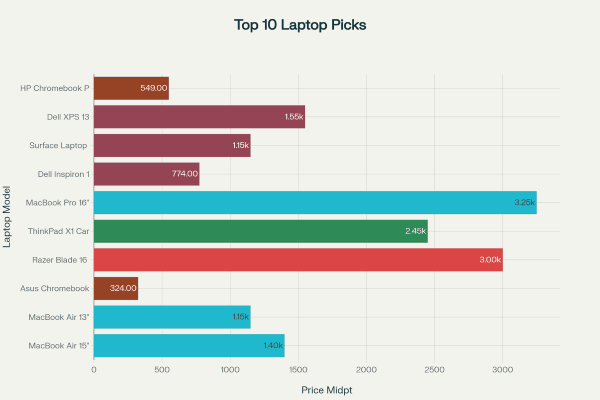
Top 10 laptop recommendations for 2025 by price range and category, showing options from budget Chromebooks to premium gaming laptops
Best Overall Laptop: Apple MacBook Air 15-inch (M4, 2025)
The MacBook Air 15-inch with Apple’s new M4 chip represents the pinnacle of mainstream laptop design, offering an exceptional balance of performance, battery life, and build quality. Starting at $1,199 (down from previous pricing), this laptop delivers desktop-class performance in a remarkably thin 3.3-pound package.
The M4 processor provides significant performance improvements over the previous generation while maintaining the fanless design that keeps the laptop completely silent. With up to 18 hours of battery life for video playback and 15+ hours for real-world usage, the MacBook Air 15-inch easily lasts through full workdays and beyond.
The 15.3-inch Liquid Retina display with 2880×1864 resolution offers exceptional color accuracy and brightness, making it ideal for both productivity work and media consumption. The larger screen provides substantial workspace for multitasking while remaining highly portable. The inclusion of 16GB of unified memory in the base model (up from 8GB previously) ensures smooth performance with multiple applications and browser tabs open simultaneously.
Key advantages include excellent speakers, a best-in-class trackpad, MagSafe charging, and seamless integration with other Apple devices. The laptop excels for students, professionals, and creative users who need reliable performance without the complexity of managing a Windows machine.
Best Student Laptop: Apple MacBook Air 13-inch (M4, 2025)
For students seeking premium performance at a more accessible price point, the 13-inch MacBook Air with M4 processor offers exceptional value starting at $999. This laptop provides the same M4 performance as its larger sibling in a more compact 2.7-pound form factor.
The 13.6-inch display with 2560×1664 resolution delivers sharp visuals for research, writing, and media consumption. Battery life extends beyond 20 hours for basic tasks, making it ideal for all-day campus use without carrying a charger. The robust build quality ensures it can withstand the rigors of student life while maintaining a professional appearance.
Educational pricing and student discounts often make this laptop even more affordable, while the included suite of productivity apps (Pages, Numbers, Keynote) provides alternatives to Microsoft Office. The MacBook Air’s reputation for longevity means students can expect to use the same laptop throughout their academic career.
Best Budget Option: Asus Chromebook Plus CM14
For users with basic computing needs and tight budgets, the Asus Chromebook Plus CM14 delivers impressive value at $249-399. This 14-inch Chromebook provides sufficient performance for web browsing, document editing, video streaming, and light productivity tasks.
The Chromebook Plus designation indicates enhanced specifications compared to basic Chromebooks, including 8GB of RAM and 128GB of storage. The 14-inch display offers adequate screen real estate for most tasks, while the solid build quality feels more premium than the price suggests.
Chrome OS provides automatic updates, robust security, and seamless integration with Google services. Students and casual users who primarily work in web browsers will find this laptop perfectly adequate for their needs. The 12+ hour battery life ensures all-day usage, while the lightweight design makes it highly portable.
However, users should understand Chrome OS limitations, including reduced compatibility with traditional Windows software and dependency on internet connectivity for many features. For users already invested in the Google ecosystem, these limitations are minimal.
Best Gaming Laptop: Razer Blade 16 (2025)
Gaming laptops have traditionally struggled with poor battery life and thick, heavy designs, but the 2025 Razer Blade 16 addresses these issues while delivering exceptional gaming performance. This premium gaming laptop features the latest Nvidia RTX 5080 graphics card paired with Intel’s Core Ultra 9 processor.
The 16-inch OLED display with 2560×1600 resolution and 240Hz refresh rate provides stunning visuals with perfect blacks and vibrant colors. Gaming performance at 1440p resolution exceeds expectations, with most modern titles running at high settings with ray tracing enabled.
Perhaps most impressively, the Blade 16 achieves over 2 hours of actual gaming on battery power, a significant improvement over previous gaming laptops. When unplugged, the laptop intelligently manages performance to extend battery life while maintaining playable frame rates.
The redesigned chassis is thinner and lighter than previous generations while maintaining excellent cooling performance. Build quality rivals premium ultrabooks, with a CNC-machined aluminum construction and minimal keyboard flex. At $2,500-3,500, this laptop targets serious gamers who want desktop-replacement performance in a portable package.
Best Business Laptop: Lenovo ThinkPad X1 Carbon Gen 13
Business users require durability, security features, and excellent keyboards, making the ThinkPad X1 Carbon Gen 13 an ideal choice. This 14-inch ultrabook weighs just 2.2 pounds while meeting military durability standards.
The legendary ThinkPad keyboard provides the best typing experience available on any laptop, with perfect key travel and tactile feedback. The TrackPoint and precision touchpad offer multiple navigation options to suit different preferences. The 2880×1800 OLED display option delivers exceptional image quality for presentations and detailed work.
Business-focused features include advanced security options like IR face recognition, fingerprint readers, and TPM 2.0 encryption. The laptop supports up to three external displays through Thunderbolt 4 ports, making it ideal for dock-based office setups.
Battery life extends 12-15 hours depending on usage, while rapid charging capabilities minimize downtime. The ThinkPad’s reputation for reliability and Lenovo’s business support services make this laptop a safe choice for corporate environments.
Best for Creative Work: Apple MacBook Pro 16-inch (M4, 2025)
Content creators working with 4K video, 3D rendering, or complex design projects need maximum performance, making the MacBook Pro 16-inch with M4 Pro or M4 Max chips the optimal choice. These processors include dedicated media engines that accelerate video encoding and playback significantly.
The 16.2-inch Liquid Retina XDR display supports P3 wide color gamut and 1,600 nits peak brightness, providing exceptional color accuracy for professional work. The optional nano-texture coating reduces reflections in bright environments.
Performance benchmarks show substantial improvements over Intel-based MacBooks and most Windows workstations, particularly for creative applications optimized for Apple Silicon. The laptop handles 4K video editing, 3D rendering, and complex Photoshop operations without thermal throttling.
Despite the powerful processors, battery life remains exceptional at over 20 hours for typical usage. The improved webcam, six-speaker sound system, and comprehensive port selection (including HDMI and SD card slot) address professional workflow requirements.
Starting at $2,499, this laptop represents a significant investment but provides unmatched performance for creative professionals.
Best Battery Life: Dell Inspiron 14 Plus
Users who prioritize all-day battery life without premium pricing should consider the Dell Inspiron 14 Plus, which achieves an remarkable 18+ hours of usage. This laptop balances performance, battery life, and affordability effectively.
The 14-inch display provides adequate workspace while keeping the laptop portable at reasonable weight. Performance from Intel Core Ultra processors handles productivity tasks smoothly, though it’s not designed for demanding creative work or gaming.
The build quality feels solid despite the affordable pricing, with minimal keyboard flex and a responsive touchpad. The design is understated and professional, suitable for business environments.
At $649-899, this laptop offers exceptional value for users who need reliable performance and extended battery life without premium features. Students, remote workers, and frequent travelers will appreciate the combination of endurance and affordability.
Best 2-in-1: Microsoft Surface Laptop 13-inch
The Surface Laptop 13-inch represents Microsoft’s most refined laptop design, offering premium build quality and seamless Windows 11 integration. The Snapdragon X Plus processor provides excellent battery life (16-20 hours) while maintaining good performance for productivity tasks.
The 13.8-inch touchscreen with 2304×1536 resolution offers vibrant colors and smooth touch response. The alcantara fabric keyboard deck provides a unique premium feel, though some users prefer traditional materials. The design aesthetic rivals Apple’s MacBooks with clean lines and minimal branding.
Windows 11 integration includes features like Windows Hello face recognition, Copilot AI assistance, and seamless cloud synchronization. The laptop works well for hybrid work environments, transitioning smoothly between home and office setups.
However, the Snapdragon processor, while efficient, may have compatibility issues with some specialized software. Users should verify their critical applications work properly on ARM-based Windows before purchasing.
Best Ultrabook: Dell XPS 13
The Dell XPS 13 with Intel’s new Lunar Lake processors delivers the classic premium ultrabook experience with significant improvements in battery life and performance efficiency. The laptop achieves 15+ hours of battery life while maintaining strong performance.
The 13.4-inch display with 2880×1800 resolution provides excellent clarity and color accuracy in a compact form factor weighing just 2.6 pounds. The CNC-machined aluminum construction feels premium and durable.
The edge-to-edge trackpad and adaptive function row represent controversial design choices that some users love while others find problematic. The keyboard feels good for extended typing sessions, though the function row takes adjustment.
Thunderbolt 4 ports provide extensive connectivity options through docking stations, making this laptop suitable for professional environments requiring multiple displays. The laptop’s slim profile and premium materials make it ideal for executives and frequent travelers.
Best Chromebook: HP Chromebook Plus 15.6-inch
The HP Chromebook Plus 15.6-inch elevates the Chromebook experience with a larger display, improved performance, and premium build quality at $449-649. The 15.6-inch display provides comfortable workspace for productivity tasks.
Chromebook Plus specifications include 8GB of RAM and 128GB of storage, substantial improvements over basic Chromebooks. Performance feels responsive for web applications, Google Workspace, and Android apps.
The larger screen makes this Chromebook suitable for users who primarily work in web browsers but want more screen real estate than smaller models provide. Battery life extends beyond 10 hours, ensuring all-day usage.
Build quality exceeds expectations for the price point, with a solid keyboard and responsive trackpad. This Chromebook works well for students, seniors, or users with straightforward computing needs who want a larger display.
2025 Technology Trends and Considerations
Processor Evolution
The laptop processor landscape has transformed dramatically in 2025, with multiple companies delivering significant improvements in performance and efficiency. Apple’s M4 chips continue setting the standard for performance-per-watt, while Intel’s Lunar Lake processors finally deliver the battery life improvements promised for years.
Qualcomm’s Snapdragon X Elite and X Plus processors bring ARM architecture to Windows laptops, offering excellent battery life though with some software compatibility considerations. AMD’s Ryzen AI 300 series focuses on AI acceleration and gaming performance.
Most new processors include Neural Processing Units (NPUs) for AI acceleration, though practical applications for consumers remain limited in 2025. These features will likely become more valuable as software developers optimize for local AI processing.
Display Technology
OLED displays are becoming increasingly common in premium laptops, offering perfect blacks, vibrant colors, and improved contrast ratios compared to traditional LCD panels. However, OLED screens may show flickering that bothers some users, and burn-in remains a theoretical concern for static content.
Higher refresh rates (120Hz, 144Hz, 240Hz) are becoming standard in gaming laptops and some premium models, providing smoother motion for gaming and scrolling. For most users, 60Hz remains adequate for productivity tasks.
Memory and Storage
16GB of RAM has become the new standard for quality laptops, replacing 8GB as the baseline for smooth multitasking. Users planning to keep laptops for several years should prioritize 16GB configurations.
SSD storage is universal in quality laptops, with NVMe drives providing fast boot times and application loading. 256GB remains adequate for users who store files in cloud services, while 512GB provides comfortable local storage for most users.
Connectivity and Ports
USB-C and Thunderbolt 4 have become standard on premium laptops, providing power delivery, data transfer, and display connectivity through single ports. However, many laptops still include USB-A ports for compatibility with existing peripherals.
Wi-Fi 7 is becoming standard in new laptops, providing faster wireless speeds and better performance in congested networks. Most users won’t notice dramatic differences compared to Wi-Fi 6, but the future-proofing value is significant.
Buying Recommendations by Use Case
Students
Budget-conscious students should consider Chromebook Plus models ($300-500) for basic needs or the MacBook Air 13-inch M4 ($999-1,299) for comprehensive capabilities. The MacBook’s longevity and included software make it cost-effective over four years of education.
Business Professionals
The ThinkPad X1 Carbon Gen 13 ($1,999-2,899) provides the durability, security, and keyboard quality business users require. Alternative options include the Dell XPS 13 ($1,299-1,799) for premium aesthetics or Surface Laptop 13-inch ($999-1,299) for Windows integration.
Content Creators
The MacBook Pro 16-inch M4 ($2,499-3,999) offers unmatched performance for video editing, 3D rendering, and design work. Windows alternatives include high-end Dell Precision workstations, though they typically cost more and offer shorter battery life.
Gamers
Casual gamers can choose mid-range options like the Acer Nitro V15 ($700-1,000), while enthusiasts should consider the Razer Blade 16 ($2,500-3,500) for premium performance. Gaming laptops require careful consideration of thermal management and battery life expectations.
Remote Workers
The Dell Inspiron 14 Plus ($649-899) excels for remote work with exceptional battery life and reliable performance. Users needing premium features should consider the MacBook Air 15-inch M4 ($1,199-1,599) for the best overall experience.
Conclusion and Final Recommendations
The laptop market in 2025 offers exceptional choices across all price points and use cases. Apple continues leading in performance-per-watt and overall user experience, while Intel’s Lunar Lake processors restore competitiveness to Windows laptops. Gaming laptops finally achieve acceptable battery life, and Chromebooks provide compelling value for basic computing needs.
For most users, the MacBook Air 15-inch M4 represents the best balance of performance, battery life, and build quality, justifying its premium pricing through superior user experience and longevity. Budget-conscious users will find excellent value in Chromebook Plus models, while professionals should prioritize business-focused features in laptops like the ThinkPad X1 Carbon.
The key to choosing the right laptop lies in honestly assessing your needs, budget, and platform preferences. With the quality of modern laptops across all categories, most users will be satisfied with their choice as long as it matches their specific requirements and use patterns.